Photobook Designer Software for Print Businesses - Photopress
What print businesses need from photobook designer software
Print businesses already understand production. The harder problem is helping customers turn a large group of personal photos into a complete, approved book without asking your team to rebuild every page by hand.
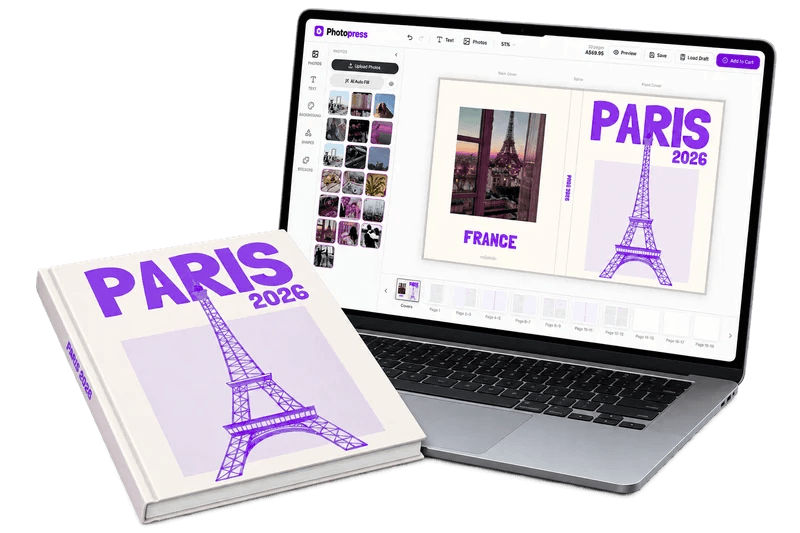
Photobook designer software should connect the customer-facing creative process to the production process behind it. Customers need a clear browser-based way to upload photos, arrange pages, add text, and review the result. Your team needs a consistent order, a predictable file, and enough control to use the printer or bindery that fits your standards.
If your business sells through Shopify, the photobook printing workflow guide is a useful companion to this software overview. It focuses on the decisions that still matter after the editor is chosen.
Build the design-to-production workflow in five parts
1. Map your production requirements
Document book sizes, page ranges, cover types, bleed, trim, color expectations, image resolution, file naming, and the checks required before a job reaches production.
2. Give customers a controlled editor
Use templates, safe areas, page rules, and clear preview states to give customers creative freedom without making every production decision unsafe.
3. Validate the finished output
Compare the preview with the print-ready PDF. Check page order, crops, text, resolution, bleed, trim, and the filename or order reference your team needs.
4. Connect the order handoff
Make it obvious which file belongs to which Shopify order and who is responsible for the next step. A simple handoff prevents production delays and avoidable support work.
5. Pilot before scaling
Run a small set of real books with different page counts, image qualities, covers, and customer devices. Use the results to improve templates, instructions, and production checks.
"A print business should not have to choose between a flexible customer editor and control over the file it produces."
Keep the customer experience simple without losing production control
Photobooks can become complicated quickly. There may be dozens of photos, multiple page layouts, captions, cover choices, and a final approval decision. Good software hides unnecessary complexity while keeping the important rules visible.
Templates are especially useful for print businesses. A template can guide the customer toward a balanced page while still allowing them to change photos, text, and layouts. Include examples for travel books, weddings, family memories, baby milestones, and other occasions your customers already ask for.
Separate the editor from the printer
Your production capabilities and your customer editor serve different jobs. The editor helps the customer create a book. The printer or bindery turns the approved file into a physical product. Keeping those layers separate means you can work with the production partner that matches your size, materials, quality standards, and delivery needs.
Photopress gives Shopify merchants a dedicated photobook editor with photo uploads, layouts, text, previews, saved drafts, extra pages, and print-ready PDF output. That lets a print business sell the product through a branded store while keeping the production handoff documented and under its control.
What to check before choosing software
Ask to see the complete workflow, not only a polished editor screenshot. Upload a realistic group of images from a phone, create several pages, return to a saved draft, change the cover, preview the book, complete checkout, and inspect the file your production team receives.
Also check the operational details. Can your team identify the order? Are the files available in the format your printer expects? Can you explain image-quality warnings to customers? Can you change templates and page options without rebuilding the store? These questions matter more than a long feature list.
Use Shopify as the storefront and Photopress as the creation layer
Shopify can handle the storefront, checkout, payments, and customer relationship. Photopress adds the specialized book-making experience that turns a standard product into a custom order. This division gives a print business a practical route to sell online without asking customers to email a folder of images and wait for manual design work.
Start with one format and one strong template family. Link the product page to the editor, explain the steps clearly, and define what happens after checkout. Once the workflow is reliable, add new book sizes, occasions, and upgrades based on completed orders rather than assumptions.
Measure the workflow like a production process
Track design starts, upload completion, saved drafts, completed previews, cart additions, orders, reprints, support questions, and the time from order to production-ready file. Those signals show whether the issue is marketing, customer guidance, editor usability, or fulfillment.
A better designer is not only one with more tools. It is one that helps customers complete a book while giving your team the information and file quality needed to produce it consistently. Use the Shopify photobook app comparison guide and the print-on-demand workflow guide as next steps when planning the wider system.
Frequently asked questions
What is photobook designer software?
It is software that lets customers create a multi-page photobook by uploading images, arranging layouts, adding text, reviewing pages, and preparing the finished design for production.
Can a print business use Photopress with its own printer?
Photopress provides print-ready PDF output, so a Shopify merchant can route completed designs to the printer, bindery, or in-house workflow that meets its production requirements.
What should print businesses test before launch?
Test realistic photo uploads, page editing, saved drafts, previews, checkout, order identification, PDF specifications, image quality, bleed, trim, and the handoff to production.
Why use a dedicated photobook designer instead of a generic product customizer?
A dedicated designer is built around multi-page books, large photo sets, page order, covers, previews, and production output rather than only changing one image or short text field.
Sources and further reading
Product details were checked against the vendors’ public pages. Features and pricing can change, so confirm current terms before choosing a platform.
Keep reading
How to Choose a Photobook Printing Workflow for Your Shopify Store
Compare print-partner and in-house workflows for photobooks, then build a reliable path from customer design to print-ready PDF and delivery.
PhotobooksWhy Print-on-Demand Alone Isn’t Enough for Photobook Businesses
Standard print-on-demand can handle fulfillment, but photobooks also need a dedicated multi-page editor, image workflow, and print-ready production process.
ShopifyBest Shopify App for Photobooks & Product Personalization (2026 Guide)
Discover the top Shopify apps for selling custom photobooks and personalized products. Compare the features that matter for multi-page photo products and print-ready fulfillment.
ComparisonsPhotopress vs Taopix: Shopify Photobook Software Comparison
Compare Photopress and Taopix on launch time, contracts, editor usability, pricing clarity, integration burden, and merchant control before committing to a long implementation project.
Ready to start selling custom photobooks?
Join hundreds of merchants giving their customers the best creation experience on Shopify.
Book a Demo