Shopify Photobook Plugin - Sell Custom Photo Books Online
What is a Shopify photobook plugin?
A Shopify photobook plugin adds the creation layer that a standard product page cannot provide. Instead of asking a customer to buy a generic book and send photos later, it lets them create a multi-page product as part of the shopping journey.
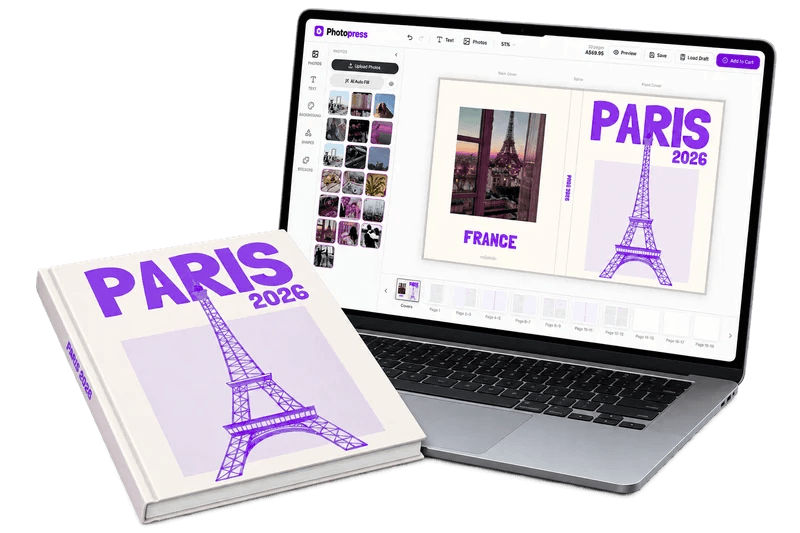
The right tool needs to work for both sides of the order. Customers need a clear way to upload images, arrange pages, add text, preview their book, and return to saved work. Merchants need product control, consistent order data, and a reliable path from the finished design to production. If you are comparing broader options, start with our guide to choosing a Shopify photobook app.
The features that matter in a Shopify photobook plugin
Photo uploads that feel manageable
Customers should be able to add the images they already have, see what uploaded successfully, and continue without losing their place. Clear image guidance reduces confusion before design work begins.
Real multi-page editing
A photobook is more than a single customizable image. Look for page navigation, reusable layouts, cropping, text, cover editing, page controls, and a way to review the complete book.
Preview and approval
Customers should see how their finished book is expected to look before checkout. Preview states and clear approval steps help catch missing photos, awkward crops, and unfinished pages.
Saved drafts and recovery
A customer may need more than one session to finish a book. Saved work gives them a reason to return and protects the time they have already invested in the order.
Print-ready order output
The completed design should become a dependable production asset. Confirm the PDF format, page order, resolution, bleed, trim, and file naming rules with the printer or bindery you use.
A connected Shopify checkout
The product, editor, cart, and order should feel like one store experience. Avoid a flow that makes customers wonder whether their design is still attached to the item they are buying.
How the customer journey should work
The product page sets the expectation. It should show the finished format, explain the number of pages and photos, answer delivery questions, and make the first action obvious. Once the customer starts, the editor should guide them through upload, layout, text, preview, and approval in a logical order.
Keep the design experience close to the store’s identity. Customers should recognize the brand, understand where they are, and know how to get help. The custom photobook product-page guide covers the content that should appear before the editor opens.
How the merchant workflow should work
On the merchant side, the plugin should reduce manual work rather than create another inbox to monitor. Define the product configuration, page rules, pricing, and print specifications once. When an order arrives, your team should be able to identify the book, access the customer’s completed design, and send the right file into the production process.
Photopress is designed for this Shopify workflow. Customers can upload photos, work through layouts, add text, preview pages, save drafts, add pages, and create a print-ready order. Merchants can keep the storefront and checkout in Shopify while maintaining control of the production handoff.
Why a focused photobook plugin is different from a generic customizer
Generic product customizers are useful when the customer changes one image, name, or short line of text. Photobooks need a different mental model. They have multiple pages, many images, cover decisions, page order, image-quality questions, and a final review step. A tool that treats the book as a single flat product can leave too much work to the merchant.
That is why the evaluation should begin with a realistic book, not a demo image. Upload a large group of photos, create several pages, change a crop, add text, leave the editor, return to the draft, and complete checkout. Then inspect the production file and compare it with the preview.
Choose a plugin that fits your print workflow
Software and fulfillment are separate decisions. You may use a local printer, a bindery, in-house equipment, or another production partner. The plugin should give you enough output and order context to use the workflow that makes sense for your business.
Document the file requirements before launch. The photobook printing workflow guide covers the questions to ask about size, bleed, trim, color, image quality, page limits, and handoff. Your editor and your printer should agree on those rules before customers start creating books.
Use Photopress to sell custom photo books online
Photopress gives Shopify merchants a dedicated photobook creation experience instead of asking them to assemble a workaround from unrelated product options. The result is a clearer offer for the customer and a more predictable process for the team fulfilling the order.
Start with one product and a small set of templates. Watch where customers stop, which pages create questions, and which formats are actually ordered. Improve the path from product page to completed design before adding more occasions, sizes, or upgrades.
"The best Shopify photobook plugin is the one that helps a customer finish a real book and gives the merchant a dependable order to produce."
Frequently asked questions
What does a Shopify photobook plugin do?
It adds a multi-page editor to the Shopify shopping journey so customers can upload photos, arrange pages, add text, preview the result, save their work, and order a custom book.
Can customers save a photobook and finish it later?
A strong photobook workflow should support saved drafts or another recovery path so customers do not lose their work when a book takes more than one session.
Does Photopress support print-ready photobook output?
Photopress supports print-ready PDF output from the customer’s completed book, allowing the merchant to follow the production workflow that fits the store.
How should I test a Shopify photobook plugin?
Test a realistic book on mobile and desktop: upload many images, edit several pages, save and return, preview the result, complete checkout, and inspect the resulting production file.
Sources and further reading
Product details were checked against the vendors’ public pages. Features and pricing can change, so confirm current terms before choosing a platform.
Keep reading
Best Shopify App for Photobooks & Product Personalization (2026 Guide)
Discover the top Shopify apps for selling custom photobooks and personalized products. Compare the features that matter for multi-page photo products and print-ready fulfillment.
ShopifyCustom Photobook Product Pages: What to Include on Shopify
Design a Shopify product page that explains the photobook, reduces uncertainty, and moves customers from browsing to starting their design.
FulfillmentHow to Choose a Photobook Printing Workflow for Your Shopify Store
Compare print-partner and in-house workflows for photobooks, then build a reliable path from customer design to print-ready PDF and delivery.
Ready to start selling custom photobooks?
Join hundreds of merchants giving their customers the best creation experience on Shopify.
Book a Demo